 Multi-Downloader


M4A Converter Online. Instantly
Convert M4A to MP3, WAV & More – Fast, Easy, and High-Quality. Perfect for music, podcasts, and audio projects
Add URL
Upload Audio
Convert Link to M4A, MP3 & More
1000+ Sites Supported
M4A
- M4A
Auto
- Auto
-
 7Digital
- Amazon Music
- Apple Music
- Artlist
- Audio
- Audiomack
-
 Bandcamp
-
 Beatport
-
 BeatStars
-
 Boomplay
-
 Bugs
Bugs
- Deezer
-
 DI.FM
DI.FM
-
 DJ Bill Bass
- Epidemic Sound
- Internet Archive
-
 KKBOX
KKBOX
-
 LINE Music
-
 ccMixter
-
 Jamendo
-
 MakeBestMusic
-
 Melon
Melon
-
 Mixcloud
- Mureka
-
 Musopen
-
 Myinstants
-
 NetEase
-
 Pandora
-
 Pixabay
-
 Qobuz
Qobuz
-
 PrayerSong
-
 RaveDJ
-
 Smule
Smule
-
 Songer
-
 Soniva
- SoundCloud
-
 Splice
- Spotify
-
 StreetVoice
- Suno
-
 Tidal
Tidal
- Tumblr
-
 Udio
Udio
- YouTube
- YouTube Music
- Bilibili
-
 Instagram
- TikTok
-
 抖音
抖音
- 歌曲宝


M4A, FLAC, AIFF, MP3, OGG and more
Up to 100 files, max 5GB each
M4A
- M4A
Auto
- Auto
-
7Digital
- Amazon Music
- Apple Music
- Artlist
- Audio
- Audiomack
-
Bandcamp
-
Beatport
-
BeatStars
-
Boomplay
-
Bugs
- Deezer
-
DI.FM
-
DJ Bill Bass
- Epidemic Sound
- Internet Archive
-
KKBOX
-
LINE Music
-
ccMixter
-
Jamendo
-
MakeBestMusic
-
Melon
-
Mixcloud
- Mureka
-
Musopen
-
Myinstants
-
NetEase
-
Pandora
-
Pixabay
-
Qobuz
-
PrayerSong
-
RaveDJ
-
Smule
-
Songer
-
Soniva
- SoundCloud
-
Splice
- Spotify
-
StreetVoice
- Suno
-
Tidal
- Tumblr
-
Udio
- YouTube
- YouTube Music
- Bilibili
-
Instagram
- TikTok
-
抖音
- 歌曲宝
Files to be converted
Keep the same settings for all files
Remove All
Convert All
Convert More
Stop All
Download All
Remove All
Download All

100% Online, No Sign-up Needed
Convert Audio & Video to M4A — Fast, Easy & Reliable
-
Premium M4A Quality – Up to 320kbps, No Quality Loss
-
Convert 500+ formats to M4A from MP4, MP3, WAV, FLAC and more
-
Perfect for converting music tracks, podcasts, audiobooks, and more
-
Optimized for Apple & Beyond – Perfect for iTunes, iPhone, Podcasts, etc
-
Speedy Conversion – AWS cloud transcoding delivers 180X faster conversion
-
Limitless Sources – Convert links from YouTube, TikTok, Facebook and 1000+ sites
Convert to M4A
Tailored for iPhone Users, Podcasters, and Anyone Who Needs Apple-Optimized AAC Audio
Convert videos, local files, or links into premium M4A audio instantly — a streamlined workflow optimized for your Apple devices, high-quality podcasts, and space-saving music libraries

Optimized for the Apple Ecosystem
iPhone & Mac Users
iPhone & Mac Users
Convert any video or audio source into high-quality M4A (AAC) instantly. Get perfect compatibility for your iPhone, iPad, and iTunes library—experience seamless playback across all your Apple devices with zero metadata loss.

High-Efficiency Podcast Mastering
Podcasters & Editors
Podcasters & Editors
Extract crisp M4A audio for your next episode. M4A provides superior sound quality over MP3 at lower bitrates, making it the industry standard for professional podcasting. Keep your audio crystal clear while keeping file sizes manageable.

Space-Saving Music Libraries
Music Collectors & Audiophiles
Music Collectors & Audiophiles
Build a premium music library without exhausting your storage. Convert bulky formats into 320kbps M4A to enjoy high-fidelity sound that takes up 30% less space than traditional MP3s—perfect for large offline collections.

Seamless Social Media Integration
TikTok & Social Creators
TikTok & Social Creators
Extract trending audio from YouTube or TikTok directly into M4A format for fast mobile editing. Whether it's for a voiceover or a background track, get ad-free, high-speed conversions that are ready to drop straight into your editing app.

Professional-Grade Encoding
Digital Creators & YouTubers
Digital Creators & YouTubers
Say goodbye to 'Format Not Supported' errors. Use our AWS cloud-powered engine to batch-convert files into Apple-optimized AAC audio at 180X speed. The perfect tool for creating music, sound libraries, or high-quality podcasts.
Convert Any Video or Audio – 500+ Formats Supported
From MP4 and MOV to WAV and FLAC, Multi-Downloader handles all your conversion needs – Fast & secure conversions for all your audio and video projects.
400+ Audio Files
Supports 400+ Audio Formats
AAC Converter
AC3 Converter
AIFC Converter
AIFF Converter
ALAC Converter
AMR Converter
APE Converter
AU Converter
CAF Converter
DSD Converter
DSS Converter
FLAC Converter
 M4A Converter
M4B Converter
M4R Converter
MIDI Converter
MKA Converter
MOD Converter
MP3 Converter
OGA Converter
OGG Converter
Opus Converter
PCM Converter
RA / RAM
VOC Converter
WAV Converter
WEBA Converter
WMA Converter
M4A Converter
M4B Converter
M4R Converter
MIDI Converter
MKA Converter
MOD Converter
MP3 Converter
OGA Converter
OGG Converter
Opus Converter
PCM Converter
RA / RAM
VOC Converter
WAV Converter
WEBA Converter
WMA Converter
M4A Converter
M4B Converter
M4R Converter
MIDI Converter
MKA Converter
MOD Converter
MP3 Converter
OGA Converter
OGG Converter
Opus Converter
PCM Converter
RA / RAM
VOC Converter
WAV Converter
WEBA Converter
WMA Converter
500+ Video Files
Supports 500+ Video Formats
3G2 Converter
3GP Converter
3GPP Converter
AVI Converter
DV Converter
DVR Converter
FLV Converter
GIF Converter
M2TS Converter
M4V Converter
MKV Converter
MOD Converter
MOV Converter
MP4 Converter
MPEG Converter
MPG Converter
MTS Converter
MXF Converter
RM Converter
RMVB Converter
SWF Converter
TS Converter
VOB Converter
WEBM Converter
WMV Converter
WTV Converter
DV Converter
DVR Converter
FLV Converter
GIF Converter
M2TS Converter
M4V Converter
MKV Converter
MOD Converter
MOV Converter
MP4 Converter
MPEG Converter
MPG Converter
MTS Converter
MXF Converter
RM Converter
RMVB Converter
SWF Converter
TS Converter
VOB Converter
WEBM Converter
WMV Converter
WTV Converter
How to Convert M4A in 3 Simple Steps
-
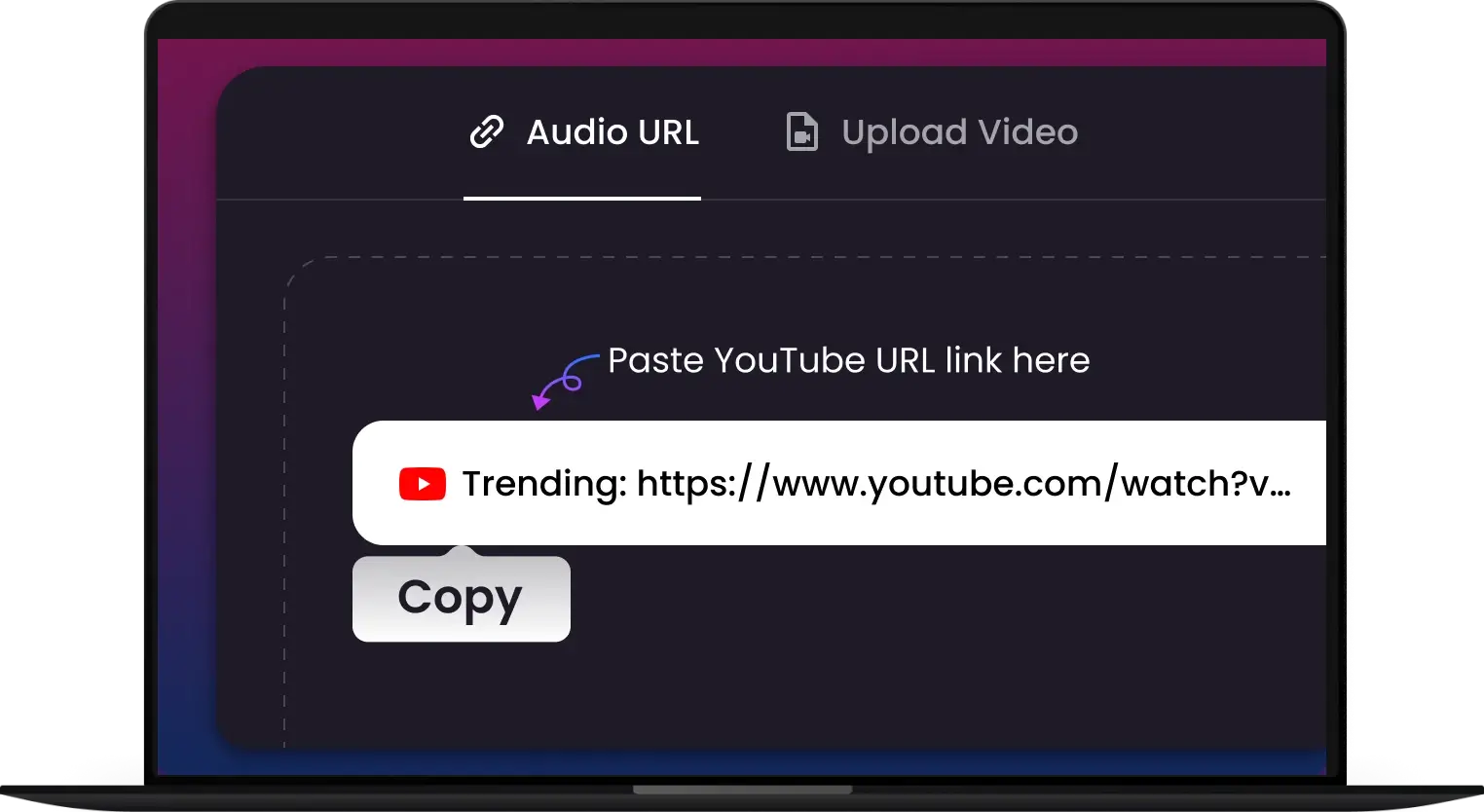
1.
Upload or Paste
Simply drag & drop your MP3, MP4, WAV, or other audio/video files into the converter. You can also paste a link from 1000+ sites.
-
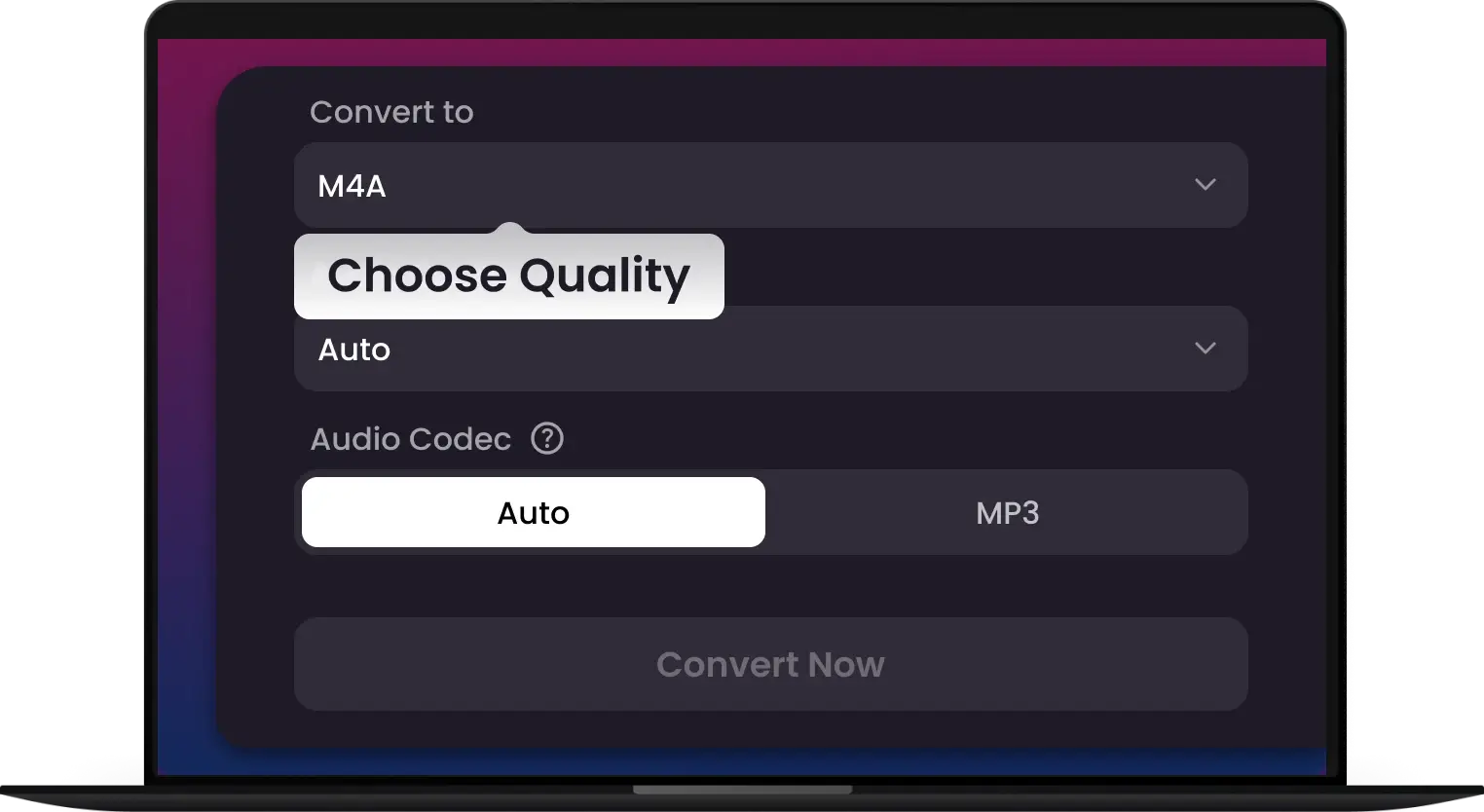
2.
Select M4A & Settings
Select M4A as your output format. Choose your desired quality, up to 320kbps for lossless sound.
-
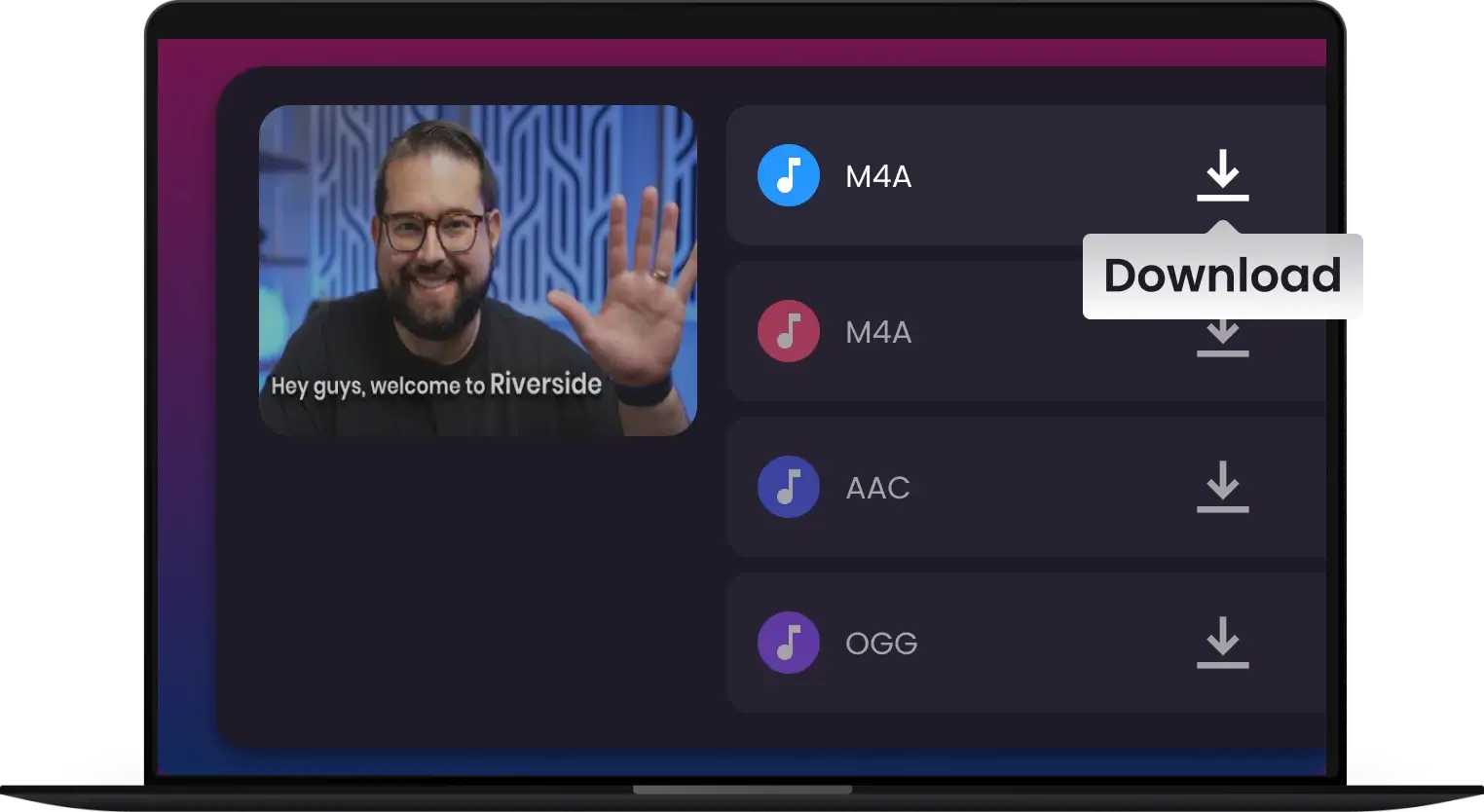
3.
Convert & Download
Click the "Convert" button and get your high-quality M4A file ready for download in seconds.
Convert Any M4A, No Exceptions
Convert from MP3, MP4, WAV, FLAC, OGG, AAC and more — one tool for all your M4A and Apple-optimized conversion needs




The Last M4A Converter You’ll Ever Need
Our users don't just use us—they recommend us. Experience the gold standard in M4A conversion

M4A is the standard for our show, and Multi-Downloader makes the conversion from raw WAV files effortless. The audio remains crisp, and I love that I can batch-process an entire season in minutes.

I’ve been cleaning up my old music library to sync with my iPhone. This tool handles FLAC to M4A perfectly. It’s fast, ad-free, and much more reliable than those 'free' sites that feel like malware.

I use this to grab audio for my edits. It converts YouTube links to M4A instantly, and the file size is tiny without losing sound quality. Perfect for mobile editing apps!

I convert all my video lectures to M4A so my students can listen on the go. It’s a streamlined workflow that just works every time. Highly recommended for anyone in the Apple ecosystem.

I make custom workout mixes and need them to fit on my Apple Watch. Converting my MP4 files to high-quality M4A saved so much space. The zero-ad experience makes it worth every penny.

Multi-Downloader's M4A converter is a game-changer. I can quickly convert files from MP4 to M4A with zero loss in quality—perfect for my studio sessions!

I love how fast and reliable this M4A converter is! I use it to convert MP3s and FLAC files into M4A for my videos and music projects, and the sound is always spot-on.

I convert everything to M4A, and this tool has never let me down. Fast, reliable, and offers flawless quality that’s perfect for my editing projects.
Frequently Asked Questions
Can I convert MP4 or MP3 files to M4A?
Yes! Our M4A converter supports MP4, MP3, WAV, FLAC, and many other formats, allowing you to easily convert them to M4A in seconds, with no loss in quality.
How long does it take to convert a file to M4A?
Converting to M4A takes just a few seconds, depending on the file size. Our cloud-powered converter ensures quick and efficient results every time.
Can I convert videos from YouTube or TikTok to M4A?
Yes. Simply paste the link from YouTube, TikTok, Facebook, or 1,000+ other supported sites. Our engine will extract the audio track and convert it directly into a high-quality M4A file for offline listening or editing.
What is the benefit of converting to M4A instead of MP3?
M4A (using AAC encoding) is designed to be the successor to MP3. It provides better sound quality than MP3 at the same bitrate while maintaining a smaller file size. It is the industry standard for Apple devices, iTunes, and high-quality streaming services.
Is this converter compatible with my iPhone and Mac?
Absolutely. M4A is the native audio format for the Apple ecosystem. Files converted here will play perfectly on your iPhone, iPad, Mac, and Apple Watch, and can be imported directly into your Apple Music or iTunes library without any issues.
Can I convert MP4 to M4A?
Yes, absolutely! You can convert MP4 to M4A instantly with Multi-Downloader. Just upload your MP4 file, and we’ll take care of the rest—quickly and without losing any sound quality.
What does the M4A stand for?
M4A stands for MPEG-4 Audio, which is a popular audio format commonly used for storing high-quality sound. It's a compressed format that provides excellent audio quality at smaller file sizes, making it perfect for music, podcasts, and audiobooks.
What is the best M4A converter?
The best M4A converter is one that offers fast, high-quality conversions with a user-friendly interface. Multi-Downloader is a top choice, allowing you to easily convert MP4, MP3, WAV, and other formats to M4A with no loss in quality.
Do you lose quality when converting M4A to MP3?
Technically, yes, there is a slight loss in quality, but for most listeners, it is virtually imperceivable if done correctly. Both M4A (AAC) and MP3 are 'lossy' formats. This means they save space by permanently removing audio data that the human ear typically can't hear. However, if you choose a high bitrate (such as 320kbps), the difference in sound quality will be minimal. For the best audio quality, consider converting M4A to WAV or FLAC instead.
Which has better sound quality, MP3 or M4A?
M4A generally offers better sound quality than MP3 at the same bitrate. M4A is often encoded with AAC (Advanced Audio Codec), which provides higher audio fidelity and better compression efficiency compared to MP3. So, if sound quality is your priority, M4A is the better choice.
One Tool for Your Audio, A Whole Suite for Your Workflow

MP4 to MP3

M4A to MP3

WAV to MP3

MOV to MP4

PDF to Word

Video to MP3

MP3 Converter

MP4 Converter

Audio Converter

Video Converter

Spotify Converter

YouTube Transcript

Video Downloader

Instagram Downloader

Music Downloader

MP3 to OGG

WAV Converter

M4A Converter

WEBM Converter

OGG Converter

MOV Converter

WEBA Converter

AVI Converter

MKV Converter

FLAC Converter

Opus Converter

AAC Converter

FLV Converter

M4V Converter

WMV Converter
MP4 to MP3
M4A to MP3
WAV to MP3
MOV to MP4
PDF to Word
Video to MP3
MP3 Converter
MP4 Converter
Audio Converter
Video Converter
Spotify Converter
YouTube Transcript
Video Downloader
Instagram Downloader
Music Downloader
MP3 to OGG
WAV Converter
M4A Converter
WEBM Converter
OGG Converter
MOV Converter
WEBA Converter
AVI Converter
MKV Converter
FLAC Converter
Opus Converter
AAC Converter
FLV Converter
M4V Converter
WMV Converter


