 Multi-Downloader


Convert MP4 to MP3 Instantly.
Convert MP4, MOV, MKV and more video formats to high-quality MP3 audio — up to 320kbps. Fast, reliable conversion supporting 1000+ video and audio formats.
Add URL
Upload Video
Convert MP4 to MP3 & More
1000+ Sites Supported
MP3
- MP3
Auto
- Auto
-
 231Worship
-
 67Movies
-
 ABEMA
ABEMA
-
 Amazon
-
 AMC
AMC
- Apple Music
- Bilibili
-
 Boosty
- BuzzFeed
-
 Cineby
-
 Coloso
-
 Crunchyroll
- Dailymotion
- Disney Plus
- Dramabox
- DramaSQ
-
 E! News
-
 Equibase
- ESPN
-
 FlixBaba
-
 Giants
- Gogoanime
- Gogoanimez
- Google Drive
- HiAnime
-
 HomeWiseDocs
-
 HPA
HPA
-
 HStorage
-
 Internet Archive
-
 LINE
LINE
- Loom
-
 Microsoft Azure
-
 Minicuddles
- MMOV
-
 Motion Array
- Movie Lair
-
 MyFlixerto
- MyVideo
-
 News 12
-
 news.com.au
-
 NHK
NHK
-
 OK.ru
OK.ru
-
 Osaka Kyoiku University
-
 OUK
OUK
- Patreon
-
 PCSchool
- Pikbest
-
 Pre-Script
-
 Reddit
- Rumble
- Skool
- Snapchat
-
 SOOP
SOOP
-
 SPWN
SPWN
-
 Threads
-
 Tidal
Tidal
- TikTok
- TokyVideo
- Tumblr
- TVer
- Twitch
- U Lifestyle
- U-NEXT
-
 Veo
Veo
- Vimeo
- VK Video
- WKYC
- X
- YouTube
- YouTube Music
-
 1069Tube
- 123AV
-
 9933TV
-
 Archivebate
-
 AShemaleTube
-
 AsiaBroSex
-
 AV01
AV01
-
 BaddiesOnly
-
 BoyfriendTV
-
 CamStreams
-
 Candfans
-
 Darkero
-
 Eporner
-
 ERo Me
-
 FapHouse
-
 HelloPorn
-
 Hentai4K
-
 HornyLeak
-
 Jable.TV
-
 LiveCamRips
-
 MissAV
-
 MyFans
-
 NJAV
NJAV
-
 PimpBunny
-
 Pornhub
- PornZog
-
 RedGIFs
-
 Redtube
-
 SpankBang
-
 ThisVid
-
 TNAFlix
- TOKYO Motion
-
 xHamster
-
 XNXX
XNXX
-
 XVideos
- 抖音
- 台視全球資訊網
- 小鸭看看


MP4, WEBM, MOV, FLV, MKV, AVI and more
Up to 100 videos, max 5GB each
MP3
- MP3
Auto
- Auto
-
231Worship
-
67Movies
-
ABEMA
-
Amazon
-
AMC
- Apple Music
- Bilibili
-
Boosty
- BuzzFeed
-
Cineby
-
Coloso
-
Crunchyroll
- Dailymotion
- Disney Plus
- Dramabox
- DramaSQ
-
E! News
-
Equibase
- ESPN
-
FlixBaba
-
Giants
- Gogoanime
- Gogoanimez
- Google Drive
- HiAnime
-
HomeWiseDocs
-
HPA
-
HStorage
-
Internet Archive
-
LINE
- Loom
-
Microsoft Azure
-
Minicuddles
- MMOV
-
Motion Array
- Movie Lair
-
MyFlixerto
- MyVideo
-
News 12
-
news.com.au
-
NHK
-
OK.ru
-
Osaka Kyoiku University
-
OUK
- Patreon
-
PCSchool
- Pikbest
-
Pre-Script
-
Reddit
- Rumble
- Skool
- Snapchat
-
SOOP
-
SPWN
-
Threads
-
Tidal
- TikTok
- TokyVideo
- Tumblr
- TVer
- Twitch
- U Lifestyle
- U-NEXT
-
Veo
- Vimeo
- VK Video
- WKYC
- X
- YouTube
- YouTube Music
-
1069Tube
- 123AV
-
9933TV
-
Archivebate
-
AShemaleTube
-
AsiaBroSex
-
AV01
-
BaddiesOnly
-
BoyfriendTV
-
CamStreams
-
Candfans
-
Darkero
-
Eporner
-
ERo Me
-
FapHouse
-
HelloPorn
-
Hentai4K
-
HornyLeak
-
Jable.TV
-
LiveCamRips
-
MissAV
-
MyFans
-
NJAV
-
PimpBunny
-
Pornhub
- PornZog
-
RedGIFs
-
Redtube
-
SpankBang
-
ThisVid
-
TNAFlix
- TOKYO Motion
-
xHamster
-
XNXX
-
XVideos
- 抖音
- 台視全球資訊網
- 小鸭看看
Files to be converted
Keep the same settings for all files
video/*,image/gif
Remove All
Convert All
Convert More
Stop All
Download All
Remove All
Download All

Ultimate Online MP3 Converter
MP4 to MP3 Online — Fast, Easy & Powerful
-
Lightning-Fast one-click MP4 → MP3 conversion
-
Zero Ads. Zero Watermarks. Zero Installs
-
Supports HD, 4K & even 8K video sources
-
Studio-Quality Output: Guaranteed audio up to 320kbps
-
Works flawlessly on Chrome, Safari, Opera, Edge & Firefox, etc
MP4 to MP3 Now
Why Our MP4 to MP3 Converter is The Best
Essential M4 to MP3 Converter for Creators, Students, Sound Lovers and More
Extract pristine audio for podcasts, custom ringtones, lectures, interviews, and more. Convert in seconds, right from your browser—your ultimate on-the-go tool.

Extract Music & Soundtracks
Musicician's Choice
Need a clean, high-fidelity audio track from a video? Whether it's a song, a movie score, or background music, our converter precisely extracts the audio. Perfect for creating custom playlists or capturing those hard-to-find music clips.

Convert Lectures to Study Audio
Student's Edge
Turn any long video into a portable MP3. Easily convert video lectures, meetings, or interviews into convenient audio files. Save storage space and listen on the go—on your phone, MP3 player, or while commuting. Perfect for efficient review and note-taking.

Prep Audio for YouTube, TikTok & Reels
Content Creator Essential
Streamline your editing workflow. Capture and isolate specific sound clips for your video projects (YouTube, TikTok, Instagram). Quickly convert footage to audio for voiceover extraction or seamless editing.

Podcast On-The-Go
Podcast Listeners
Stop being tied to video players. Easily convert long video podcasts or interviews into portable MP3 files. Save bandwidth, save battery, and listen offline on your commute, at the gym, or while running errands.

Clip & Capture Perfect Sound Effects
Sound Designers
Need a specific sound clip, quote, or effect from a piece of footage? Multi-Downloader allows you to convert the video and precisely capture only the audio snippet you require. Ideal for sound designers and media archivists.
How to Convert MP4 to MP3?
-
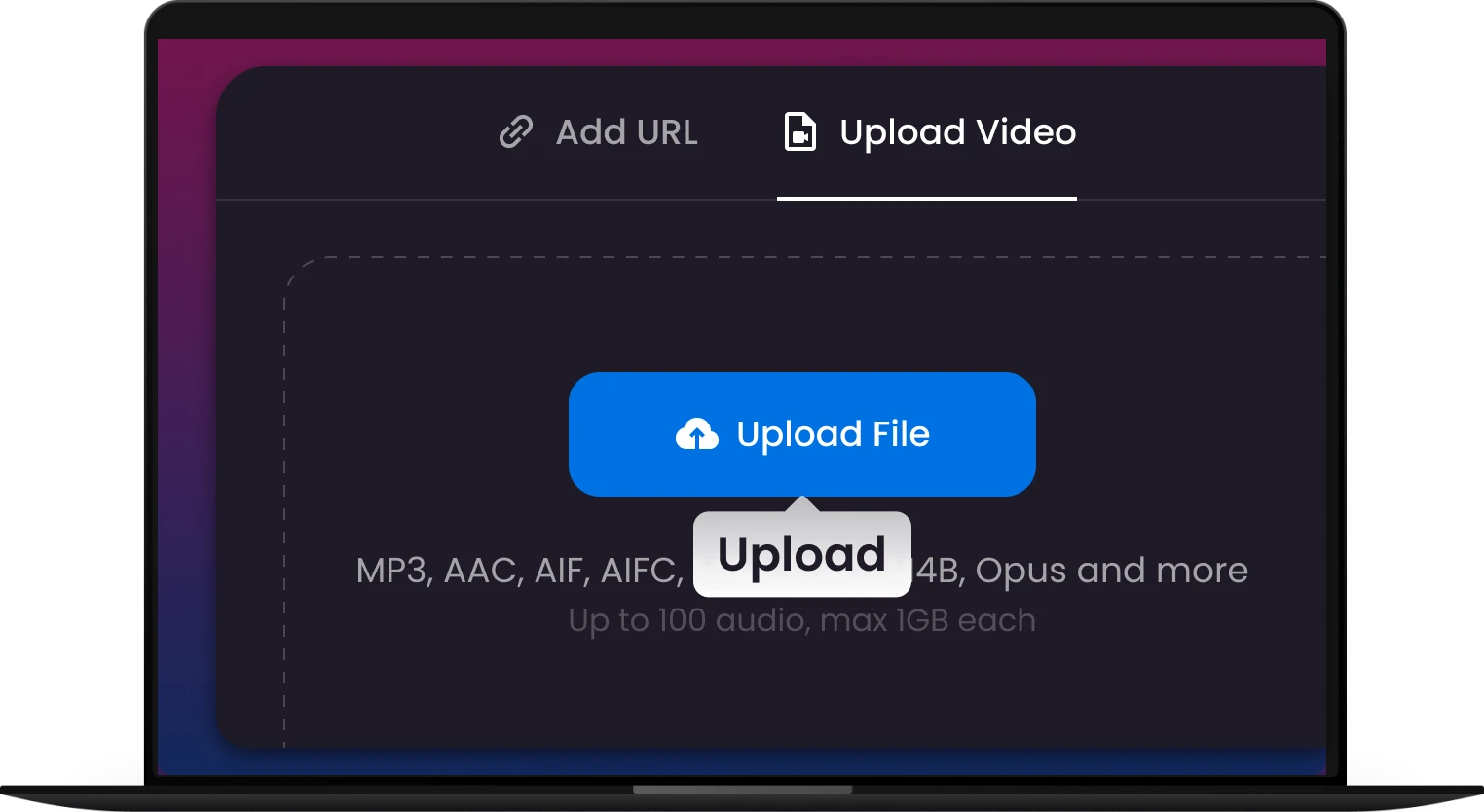
1.
Upload Your MP4
Upload or Drag & Drop any MP4 video file into the converter box.
-
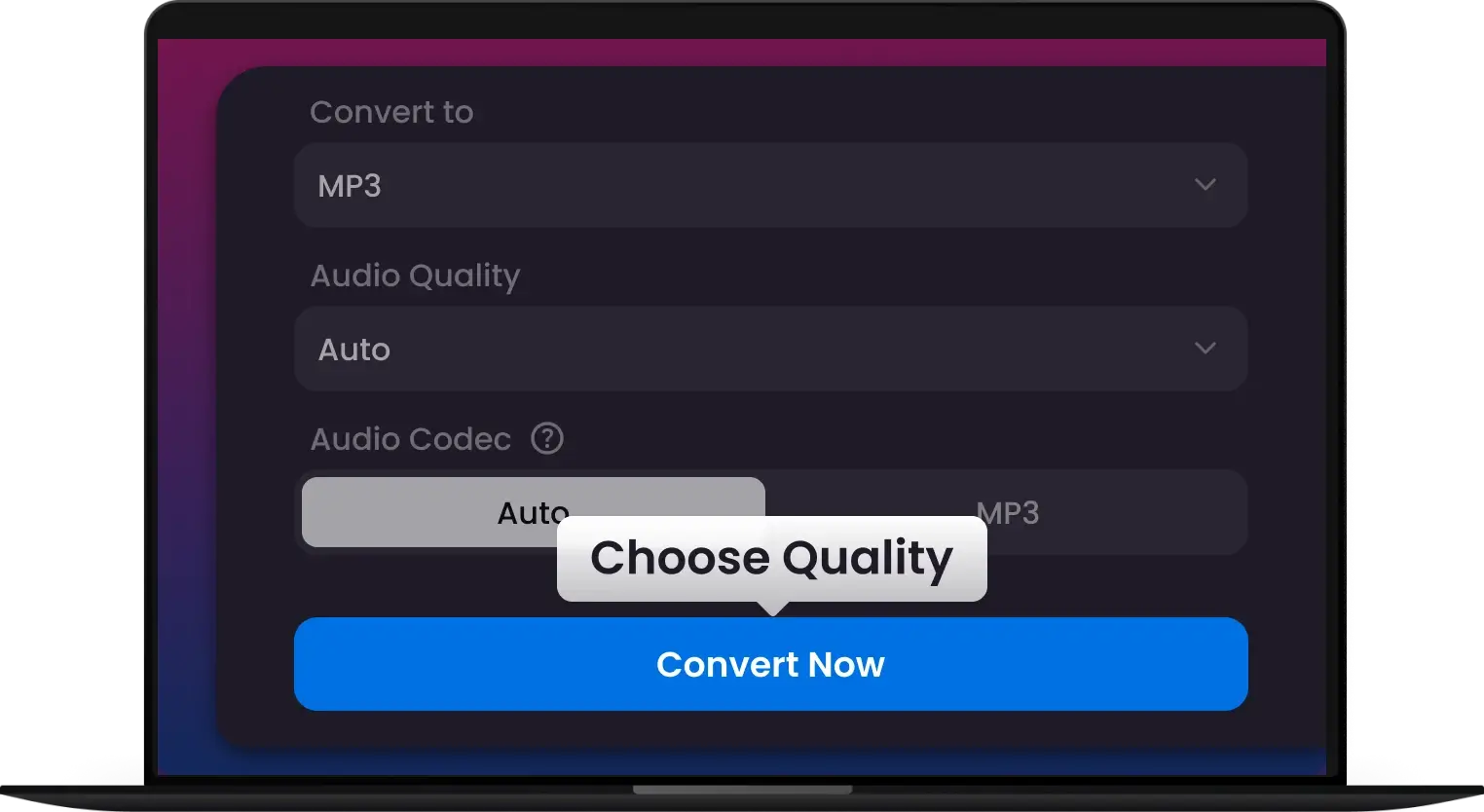
2.
Convert Instantly
Click the ‘Convert Now’ button. Our tool automatically extracts the audio track.
-
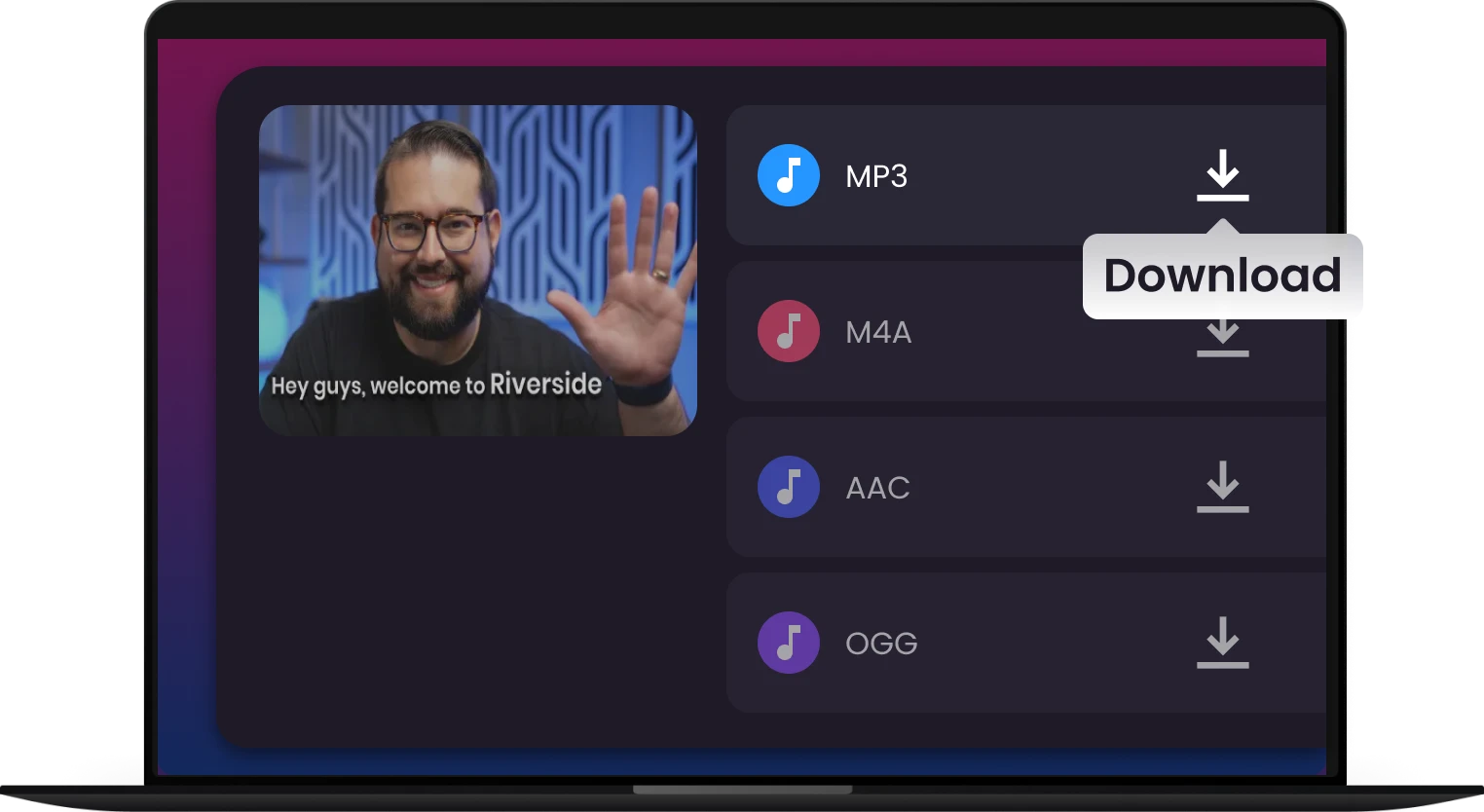
3.
Download Your MP3
Save your new, high-quality MP3 file directly to your device. Done!
Why Millions Choose Our MP4 to MP3 Converter

400+ Audio
After uploading your MP4 video, you can choose to extract audio not only as MP3 but also as WAV, AAC, M4A, APE, M4R, AIFF, FLAC, AU, OGG, AMR, MP2, Opus and more

500+ Videos
Don't Be Limited to MP4. Multi-Downloader is built as a truly universal converter, supporting MOV, MKV, M4V, FLV, DIVX, AVI, MPG, MPEG, VOB, 3GP, 3G2 ,WMV, ASF, RM, RMVB, DAT, DAV, OGV and WEBM, etc.

1000+ Websites
Skip the Download: Convert Audio Directly from Video URL! Simply paste the URL of a video from YouTube, Vimeo, Dailymotion, TikTok, SoundCloud, Twitch (Clips) and more.

320kbps HD Audio
Choose Multi-Downloader for high-quality audio extraction, every time. Select the ideal bitrate for your needs, balancing sound quality against file size,from 96 kbps up to 320kbps (Highest Audio Quality)


They Love Us, You Will Too
Join Thousands Who Trust Multi-Downloader – Read Their 5-Star Stories

As a vlogger, I need to strip audio from videos constantly. This is the fastest, most reliable free tool I've found. The quality is perfect, and it truly requires no software download

I use this site almost daily for my language courses to convert lectures to audio files. Super easy drag-and-drop feature, and I appreciate that my files are automatically deleted for security.

I often sample sounds from old videos. The conversion quality is excellent, preserving the clarity of the original track. It's the best online tool for high-fidelity MP3 extraction.

Security is paramount for me. I chose this converter because they clearly state their encryption and deletion policy. Fast and secure—exactly what I look for in an online service.

I was looking for a solution that works flawlessly on my Linux machine and my phone. This web-based converter is universally compatible and incredibly simple. Highly recommend it to anyone!

Sometimes a great podcast episode is only available as an MP4 video. Multi-Downloader is my quick fix! I convert the video to an MP3 in under a minute so I can listen on the go without draining my mobile data on video streaming. Perfect solution!

In sound design, quality is everything. I often need clean source audio from video clips. Multi-Downloader provides reliable, high-fidelity MP3 extraction without quality loss or artifacts. It’s quick, professional-grade, and a huge time-saver for my workflow.
Frequently Asked Questions
How long does it typically take to convert MP4 to MP3?
Usually just a few seconds — Pro users enjoy up to 200× faster conversions with no waiting.
Can I convert long videos? Are there any restrictions on file size or video length?
We support large file conversions. The current maximum file size is 2GB (or specify your actual limit). For files larger than this, please contact our support team.
What quality will the converted MP3 file be?
We prioritize high-quality audio extraction. By default, we use a high bitrate setting (e.g., 320kbps) to ensure your converted MP3 file maintains the best possible sound quality from the original MP4 video.
Does the Pro version support batch conversion? How many files can I convert at once?
Yes, batch conversion is a core Pro feature. You can load and convert hundreds of files simultaneously, regardless of their original size or format. Our engine processes them at high speed, saving you significant time over manual, one-by-one conversions.
Does your converter only support MP4 files?
Not at all! While MP4 is the most common format, our tool is designed to be versatile. We support a wide array of popular video formats, including MOV, AVI, MKV, WMV, FLV, and WebM. Simply upload your file, and we will handle the conversion to MP3 easily.
How to change MP4 to MP3?
You can quickly change your MP4 video file to an MP3 audio file using the Multi-Downloader Online Converter in just three simple steps.
- Step 1: Upload Your MP4 File
- Step 2: Confirm the output format is set to MP3 (Multi-Downloader handles the extraction of the audio track for you).
- Step 3: Click the "Download MP3" button to save the converted file directly to your device.
Are my uploaded files safe and private?
Absolutely. Your privacy is our priority. All file transfers are secured with 256-bit SSL encryption. We automatically delete all uploaded and converted files from our servers within 24 hours (or specify your actual time) of conversion.


